
Taking a Measurement- Effect Finish Module
How to measure Sparkle and Graininess
The measurement button is used to start single or multiple measurement that are sent directly to the table.
- Ensure the sensor is calibrated.
- To access the multiple readings feature, right click on the measurement button.
- Press the measurement button to start (1)
How to measure sparkle and graininess using the interactive measurement feature
The interactive measurement function is a "live" view of the sample surface.
The surface camera is used to identify particular areas of interest on the surface before starting a measurement.
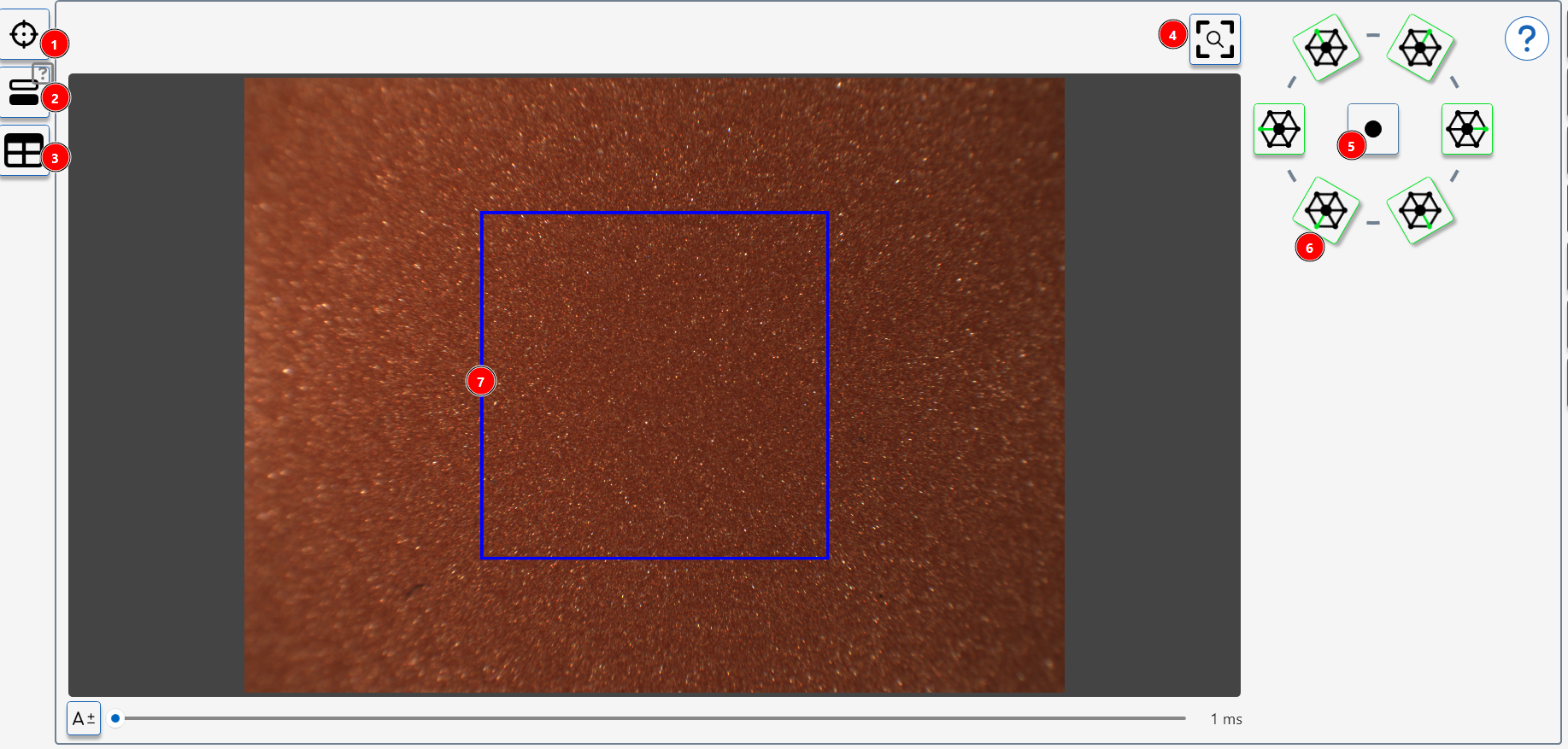
- Take a measurement
- Start calibration Procedure
- Switch to main screen with table
- Recentre camera view
- Switch on 10 degree spot light
- Switch on 45 degree light source(s)
- Standard sparkle measurement area.
Measurement Procedure
- Ensure the sensor is calibrated.
- Press the button (1) to activate the interactive measurement feature.
- Adjust the light sources as required, recommended setting are 45 Degree Light Sources- all illuminated, or single spot light only illuminated.
- Use the auto-exposure button to optimize the camera exposure for the surface's reflectivity.
- Manually adjust exposure if needed using the slider or input box.
- The blue square indicates the measurement area for this module.
- To measure the sparkle and graininess of an identified area on the surface move the sensor until the required area is enclosed by the blue square.