
Adjusting Polishing Quality Parameters
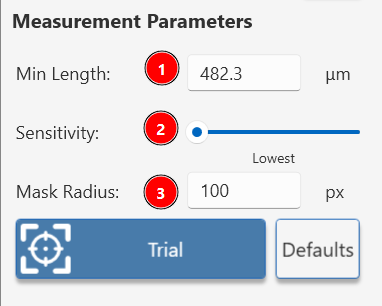
1. Minimum Length
- Purpose: Sets the smallest size of defects to be included in the analysis, measured in microns.
- How It Works:
- Larger values exclude smaller defects, focusing on more significant imperfections.
- Smaller values include finer defects but may increase detection of irrelevant marks.
- Adjustment Steps:
- Begin with a moderate value based on your quality standards (Default is 100 microns).
- Decrease the value if you need to detect shorter defects.
- Increase the value to focus only on larger imperfections.
- Adjust based on the typical size of defects relevant to your product quality criteria.
2. Sensitivity
- Purpose: Controls the threshold for detecting linear defects based on their visibility (contrast against the background).
- Options: Lowest, Low, Moderate, High, Highest
- How It Works:
- Higher sensitivity detects more subtle defects but may include false positives.
- Lower sensitivity focuses on more prominent defects, potentially missing subtle ones.
- Adjustment Steps:
- Start with "Lowest" sensitivity.
- If important defects are missed, increase the sensitivity.
3. Mask Radius
- Purpose: Excludes the direct reflection of the high-intensity spot from the analysis.
- The default radius removes the spot reflection in smooth mirror like surface.
- Increase the radius if surface haze or polishing marks are increasing the reflected spot size and interfering with defect detection.