
Keyboard Emulation
Keyboard emulation lets COM Agent type measured values directly into another program — exactly as if you had typed them on the keyboard. This is ideal for entering readings into a spreadsheet, a QA database, an ERP screen or any other application, without copying and pasting.
When a measurement completes, COM Agent types the selected value(s) into whichever window and field currently has keyboard focus.
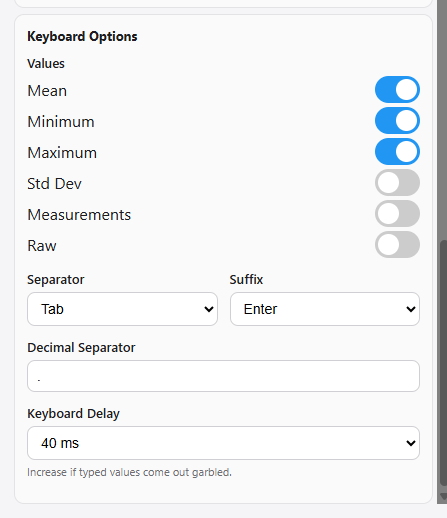
Enable it
Tick Keyboard emulation under Output Formats. The Keyboard Options appear below.
Values
Tick one or more values to type. Mean is selected by default.
| Value | Types |
|---|---|
| Mean | The mean of the measurement set |
| Minimum | The smallest reading |
| Maximum | The largest reading |
| Std Dev | The standard deviation |
| Measurements | Every individual sample reading |
| Raw | The complete raw data as received from the instrument |
When several values are selected, they are typed in the order shown above, each separated by the chosen Separator.
Separator and suffix
| Option | Purpose |
|---|---|
| Separator | The key pressed between values (and between individual measurements). Choose Tab, Enter or None. |
| Suffix | The key pressed after the last value. Choose Tab, Enter or None. |
Use Tab to move to the next cell or field, or Enter to confirm an entry / move to the next row. For example, Separator = Tab and Suffix = Enter fills a row of cells and then moves to the next row — perfect for spreadsheets.
Decimal separator
Set the Decimal Separator to match the target application — typically a full stop (.) for English locales or a comma (,) for German/French locales.
Keyboard delay
The Keyboard Delay sets a short pause after each emulated keystroke.
If typed values arrive garbled or with repeated characters, increase the Keyboard Delay. Some applications and PCs accept injected keystrokes more slowly than others. Start at the default and raise it (for example to 100 ms) until values appear correctly. The setting is saved per PC.
Example
With Mean and Minimum selected, Separator = Tab, Suffix = Enter, typing into a spreadsheet produces:
1089.4 ⇥ 1088.4 ⏎
The mean lands in the first cell, the minimum in the next, and the cursor moves to the following row — ready for the next measurement.
Keyboard emulation does not write a file. To keep a record and type values, also tick Text or CSV under Output Formats.