Install COM Agent
Rhopoint COM Agent is a lightweight Windows application. The installer sets up everything it needs and keeps the application up to date automatically.
Download
Download the latest version of COM Agent from download.rhopointservice.net/com-agent.
Installation
- Download the COM Agent installer from the link above.
- Double-click the installer and follow the on-screen instructions.
- Launch Rhopoint COM Agent from the Start menu.
System requirements
- OS: Windows 10 (build 19041 / 20H1) or newer
- CPU: x64 or ARM64
- A free serial (COM) port — either a built-in port or a USB-to-serial adapter — to connect your instrument. Some instruments require a special cable (see the overview).
First start
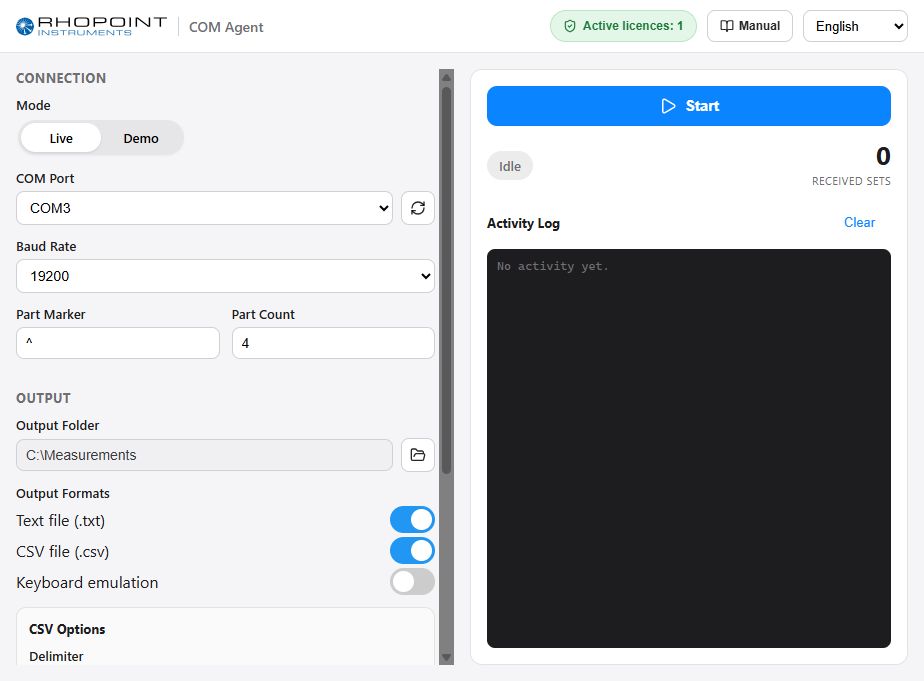
When COM Agent starts, the main window is divided into two areas:
- On the left, the configuration: connection settings and output options.
- On the right, the live activity: status, the number of measurements received, the last measurement and an activity log.
The Start / Stop button sits at the top right, above the measurement counter, and is always visible.