
Esta página aún no está traducida y se muestra en inglés.
AE Licence Manager
To install instrument and module licences, follow these steps:
- Licences are emailed to you when your instrument is shipped from the Rhopoint factory.
- Download the received licenses onto your PC.
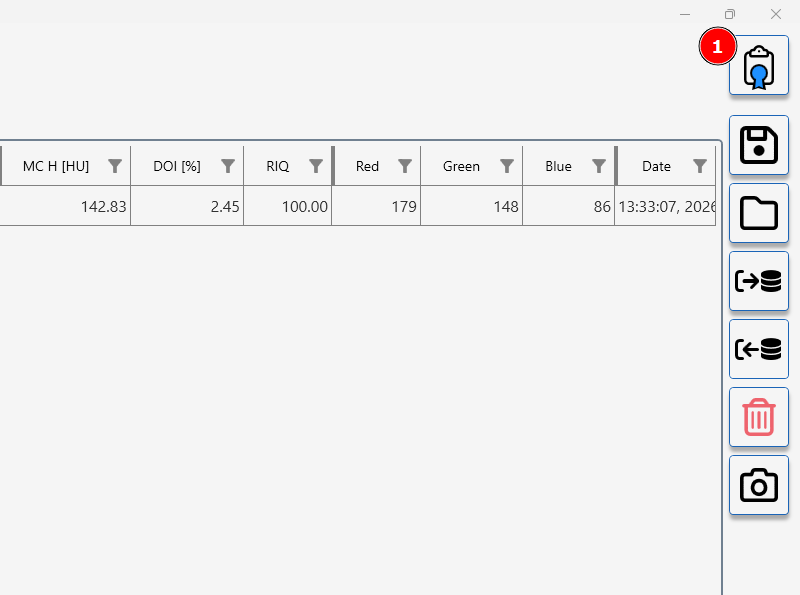
- Click the License Manager (1) button.
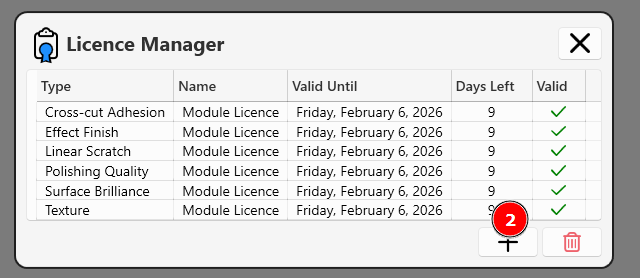
- Press the add licenses button (2)
- Select the saved license(s) to install them.
Additional Information
Replacement Licenses: If you've lost your licenses, you can request them to be resent. Contact sales@rhopointinstruments.com and provide:
- The serial number of your instrument
Demo Licenses: Rhopoint offers a free 2-week trial for all instruments and modules.
To obtain a demo license, contact sales@rhopointinstruments.com.
Additional Licenses: To purchase licenses for a new module please contact your regional Rhopoint office, premium authorised distributor or send an email to sales@rhopointinstruments.com.